
If you have a Shopify store, you’ve probably received an alert with a label “High-Risk” for an order. Shopify flags such transactions automatically if the system suspects that there’s a potential attempt at fraud, and not a legitimate purchase. The issue is that many high-risk orders can quickly turn into chargeback fraud, and as a business, you don’t want that. For that, Shopify suggests its built-in fraud analysis tool that helps spot risky orders early.
But what else is there to know? We provide our expert tips with steps to take, showing why identity verification can be beneficial for reducing high-risk orders and the unwanted consequences that come along with them.
What is Considered a High-Risk Order on Shopify?
A high-risk order on Shopify is a suspicious purchase that’s automatically marked by its fraud detection system. The system is constantly updated and uses AI and machine learning to detect fraudulent transactions. For example, an order is flagged as “High-Risk” if the postal code doesn’t match the customer’s credit card address, as this can indicate an attempt to disguise their identity.
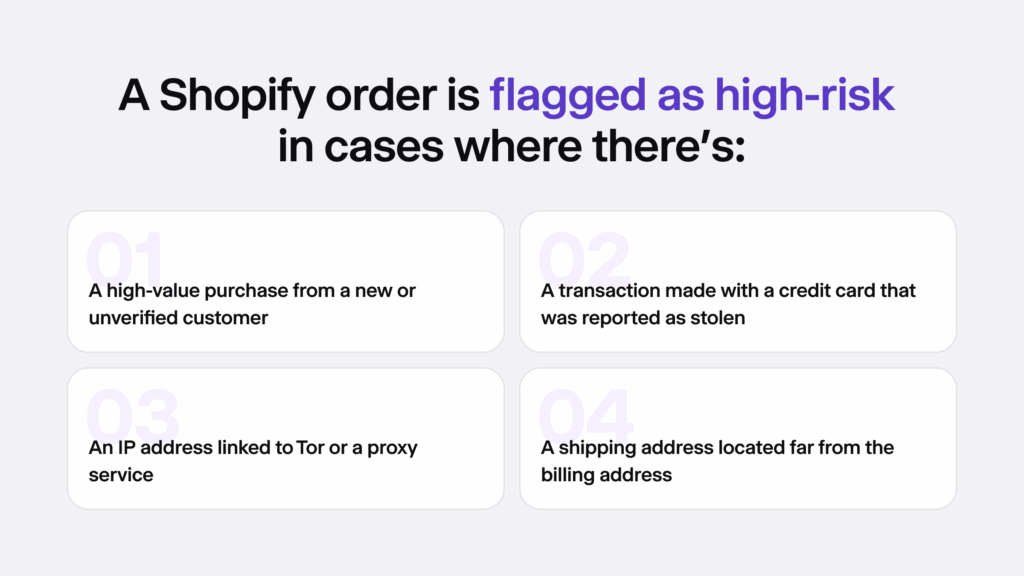
For example, another classic scenario of a high-risk order on Shopify is when the customer uses someone else’s card, and not their own, to place an order. This is a known tactic among fraudsters who steal credit card information to conduct payment fraud, and it can happen anywhere online, including your Shopify store.
Why High-Risk Orders Can Translate to Chargebacks
High-risk orders only turn into more fraudulent chargebacks when you leave them unmanaged, such as when you don’t use identity verification.
Ultimately, this can mean that as a business owner, you risk:
- Spending a lot of time and money on chargebacks that harm your business and your reputation.
- Refunding legitimate cardholders and still paying extra administrative fees.
- Having your Shopify store blocked from Shopify payments due to too many chargebacks.
So in this sense, even if the best interest here is to sell more, it’s very important to invest in proper fraud prevention methods and optimize the chargeback rate so that fraudulent payments don’t turn into major losses for your business.
Related: The State of E-Commerce Fraud Prevention Software [Popular Integrations]
What Does Shopify’s List of Indicators Mean?
Every order on Shopify is analyzed based on specific signals that are designed to check if the order looks suspicious. Shopify’s system is backed by large data sets and uses complex algorithms. As a store owner, you don’t see many of the details behind a high-risk alert from Shopify. You’ll know an order is flagged, but you often get only a general warning rather than a full breakdown of why it happened.
For example, depending on the concrete plan that you have on Shopify, the fraud analysis system tracks and shows signals like:
- Big purchases from brand-new customers
- Multiple failed purchase attempts
- Several orders that were made within a short period of time
Each order has a list of signals or indicators that are marked by Shopify’s system in different colours (green, red, or grey), making it easier to spot the most risky red flags. Red is the most fraudulent indicator, the gray one requires extra assessment or your review and the green signals are proof of legitimate orders.
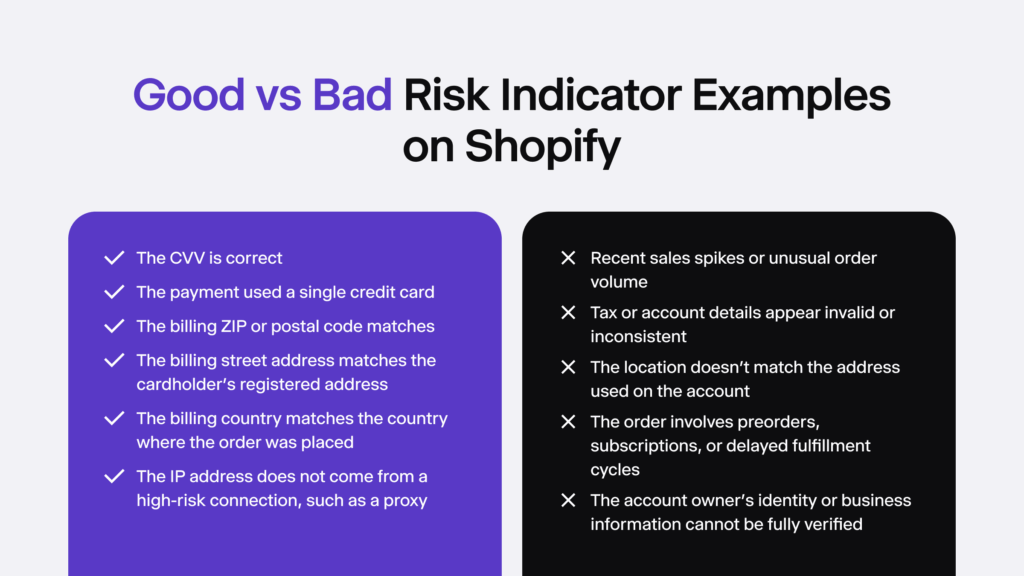
For example, the list shows factors like whether the customer entered the correct CVV code and whether they tried more than one credit card. However, not all indicators appear for every order.
Can You Prevent High-Risk Buyers From Your Shopify Store?
The short answer is no, you can’t entirely prevent fraudsters from visiting your store. There are measures like IP address detection that automatically detect and restrict certain IPs, for example, those that come from high-risk locations with a high fraud rate. Alternatively, you can create an internal custom blocklist with known fraudsters.
To blacklist a customer, go to their profile → click on the Tags section → and then, add the tag Blacklist to set up custom automated workflows that would automatically reject the customer from making orders. This is required only in real high-risk cases. Automated declines in all scenarios aren’t good because they can block legitimate buyers who actually want to place a valid order.
What Should You Do When a Shopify Order is Marked as High-Risk?
There are a few variants that are suitable for dealing with high-risk orders on Shopify. You can either cancel and refund the buyer, confirm the purchase if you feel that it’s safe, or continue to verify the order.
The best practice is to:
- Cancel and refund all high-risk orders that you can’t confidently verify. This helps you avoid chargebacks and saves you time.
- Verify the order if it doesn’t have any major red flags that are screaming “fraud” automatically.
To assess if the order is actually fraudulent, you can verify it by following a few key steps:
1. Check the Buyer’s IP Address
The buyer’s IP address can show their poor intentions sometimes. In e-commerce, like your Shopify store, sudden IP changes or unusual location activity can signal that the buyer is attempting to mask their identity to evade detection.
VPNs or proxies can be a sign of fraud because they’re tightly linked to fraudulent behavior online. Ask yourself due diligence questions like “Does the IP come from a hosting provider?” or “Is the IP close to the customer’s stated location?” to make sure the buyer is legitimate before approving their purchase.
2. Review the Address
Shopify flags suspicious addresses when the buyer’s shipping and billing information doesn’t match. Even though people can buy gifts and add a different address on Shopify, this sort of information can indicate fraud. Sometimes, payment providers hide billing information and it can show off as missing on your Shopify store. However, if you notice multiple orders with different billing addresses but the same shipping address, be careful as well.
On top of that, fraudsters intentionally use mismatched addresses as a way to make it harder to spot legitimate orders from risky ones. To avoid confirming a high-risk order that’s actually fraudulent, always check the billing and shipping addresses on Google Maps, especially if you’re a small business and have the ability to do so sustainably without creating backlogs. If the addresses are far apart or the addresses are not identical and belong to a strange office building, for example, take it as a red flag.
Related: Address Verification Explained
3. Check the Email and Phone Number
There are basic tools online that allow you to enter and look up phone numbers to see if they are legitimate. Sometimes, extra fraud prevention measures, like adding two-factor authentication (2FA) via SMS verification and OTPs that are sent to the user’s device (either phone or email address), also help confirm that the user is legitimate and hasn’t entered fake credentials.
Sometimes, Shopify store owners have dedicated in-house support teams that are responsible for calling or sending emails that are designed to double-check if the user has provided the right number. If they don’t respond or avoid confirming their phone/email, take it as a red flag and a fraud indicator.
4. Download an Identity Verification App
There are special identity verification plugins on the Shopify App Store that are designed to improve your existing fraud prevention system, working well with measures like Shopify’s native Risk Alerts and other fraud-scoring tools.
For example, iDenfy’s verification integration reacts to different risk indicators:
- Low-risk orders are confirmed without any extra verification steps, as a way not to overburden legitimate buyers.
- High-risk orders are treated with extra caution, meaning that using the app allows you to create a flow where ID verification is automatically triggered for suspicious transactions on Shopify.
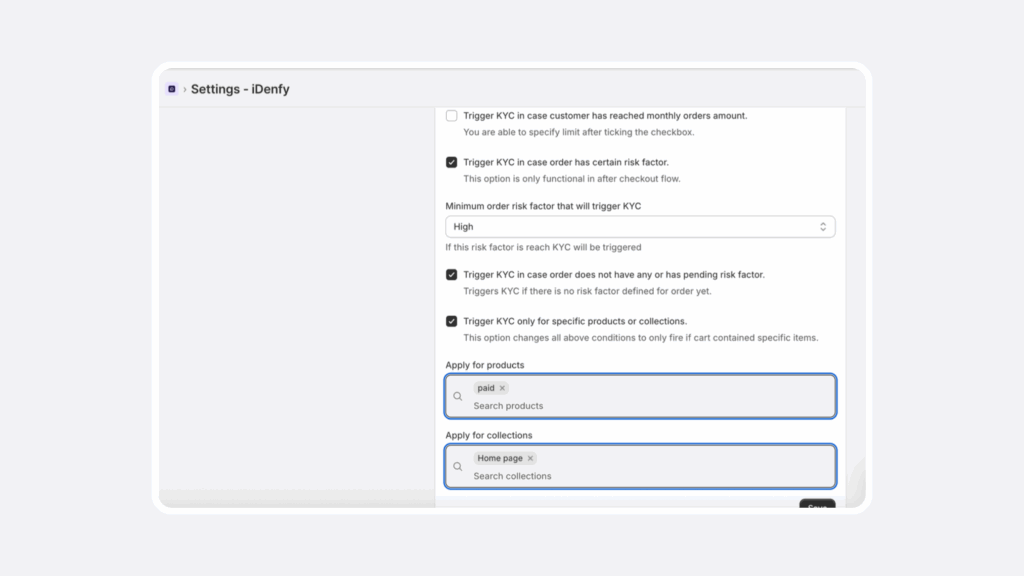
This also works well for age-restricted shops that sell items that require verifying a user’s age before checkout (can be customized and triggered only for such items) or those who need to stay compliant with Know Your Customer (KYC) and anti-money laundering (AML) regulations and require verify buyer’s identity before a certain payment threshold (for example, an atypically large purchase or has had more transactions than usual within a certain timeframe).
How Does iDenfy’s Shopify Plugin Work?
Using iDenfy’s identity verification app, customers who are flagged as high-risk or medium-risk by Shopify’s system can be automatically redirected to complete KYC verification through iDenfy’s app. This eliminates the need for other manual follow-ups and emails, or any sort of back-and-forth communication.
The buyer is guided through a familiar KYC process and doesn’t require manual input, like entering their full name. iDenfy’s solution captures and extracts identity information from their document (such as an ID card or driver’s license) and confirms that it’s legitimate within less than a minute on average.
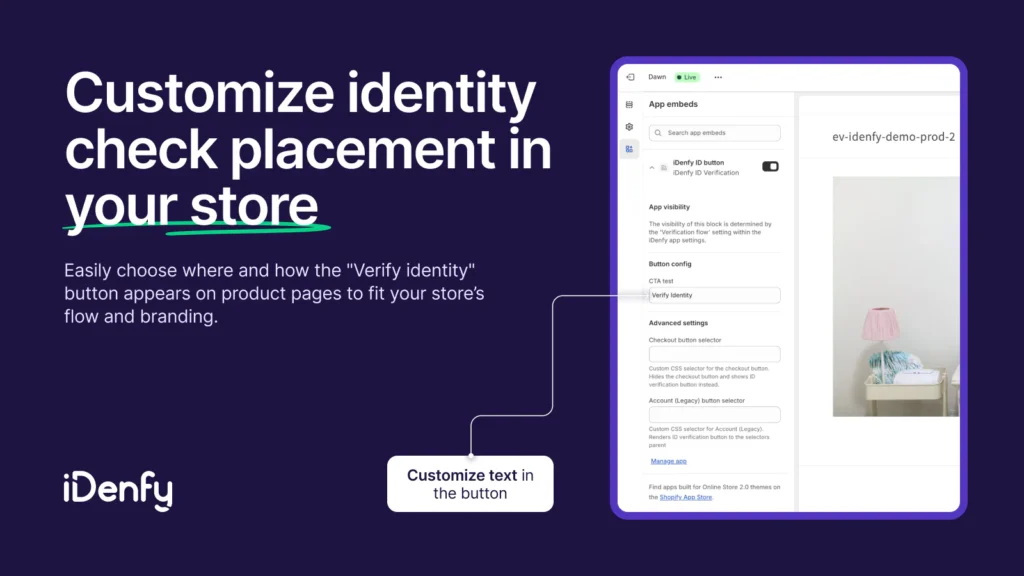
This doesn’t hurt your conversions and is considered the most effective way against fraud, including issues like unauthorized charges that often lead to chargebacks and losses.
As a Shopify merchant, you can benefit from:
- A simple and quick integration process using ready-made presets and an API key
- Customized workflows: ID document, selfie, or both layers, depending on your risk tolerance
- Full control and access to all verification status reasons, which ensures a KYC-compliant data audit log
→ Find out more about how to set up your account and use the Shopify ID verification solution here.
Final Thoughts
Using fraud prevention is vital for all Shopify merchants, especially for those that are scaling and bumping into more and more high-risk orders. While extra measures like identity verification might be a mandatory requirement for some, implementing such solutions, especially those that are designed to be user-friendly and can be downloaded straight from the Shopify App Store, can improve efficiency and offer better, automated fraud prevention options that can be customized.
That means they simplify the work for you, showing exactly which data points triggered an alert, and auto-cancelling risky orders while approving legitimate buyers without adding any unnecessary friction. Sound like something you’re interested in? Jump into a quick demo call with iDenfy’s Sales team, who’ll show you how our Shopify e-commerce fraud solutions work.





 Try for free


